One calendar for all your courts and all your days. Drag each game where it belongs, and Scored tells you the moment a placement collides with something else - while you are scheduling, not on match day.
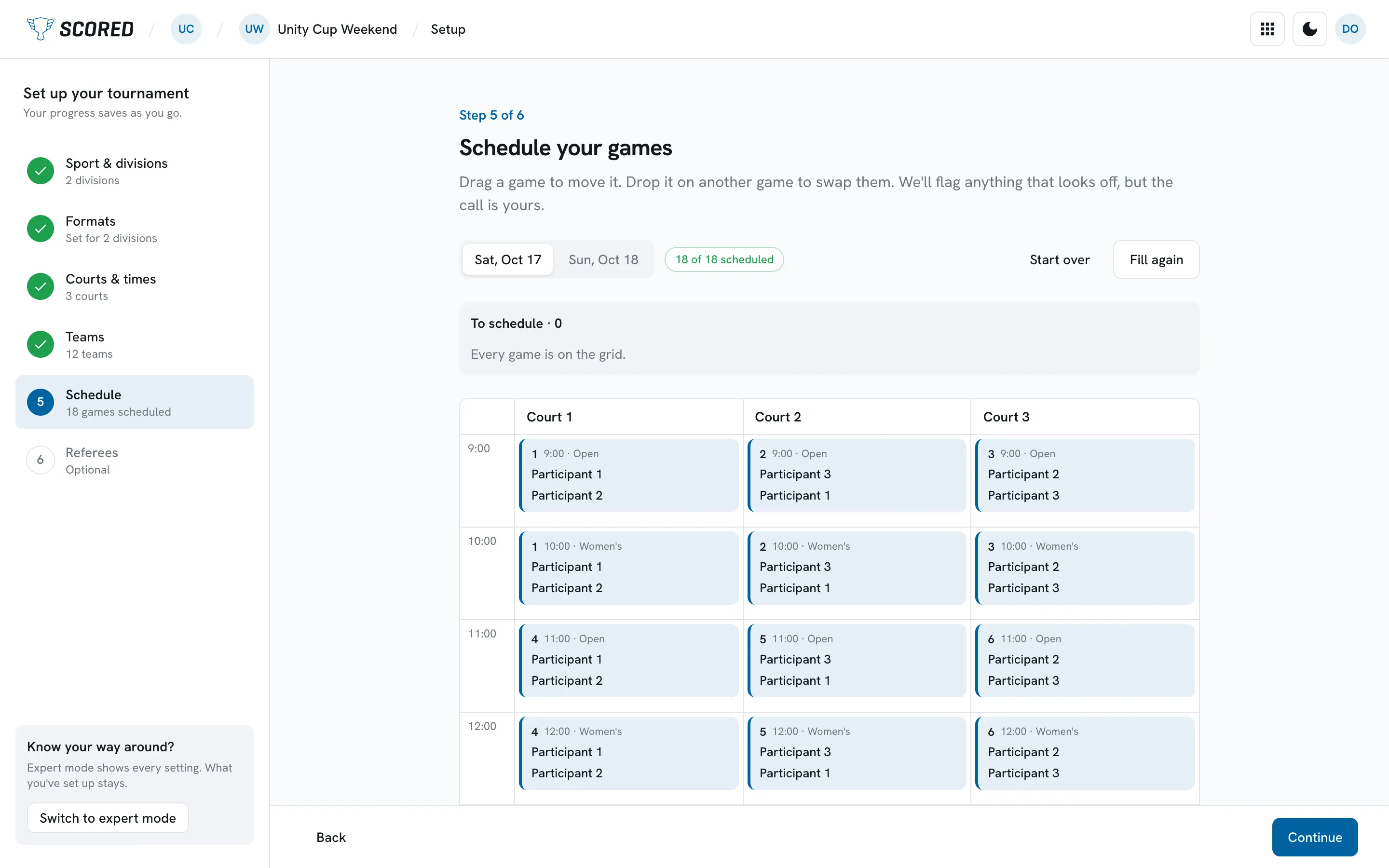
Each new tournament starts with the setup guide, which takes you from your sport to your schedule. Tell it how your divisions share the courts and whether every team gets a game off between matches, then click Fill the schedule. Scored puts your games on courts and times, and if some do not fit, it tells you why.
Then the call is yours. Drag a game to move it, or drop it on another game to swap the two. Scored flags anything that looks off while you do.
The setup guide is included on the Free plan. It places the games, not the referees.
THE SETUP GUIDE, ON A UNITY CUP DEMO TOURNAMENT
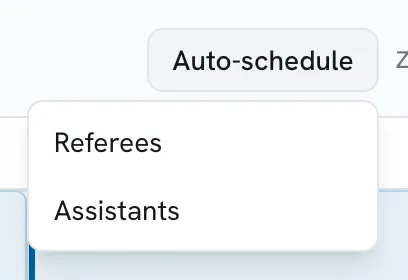
AUTO-SCHEDULE
What Auto-schedule actually does.
It assigns the referees and the participant assistants across the games on your calendar. It does not place the games.
On the Scheduling page you place those, because you are the one who knows Court 3 is the loud one, and that the team driving four hours cannot be on at nine. Scored's job is to catch what you miss while you do it - and to take the officials off your plate, which is the part nobody enjoys.
Referee scheduling comes with the Small plan at $49. Assistant referees come with Medium at $99.
THE WHOLE MENU
THE CALENDAR
Time you have, games you owe.
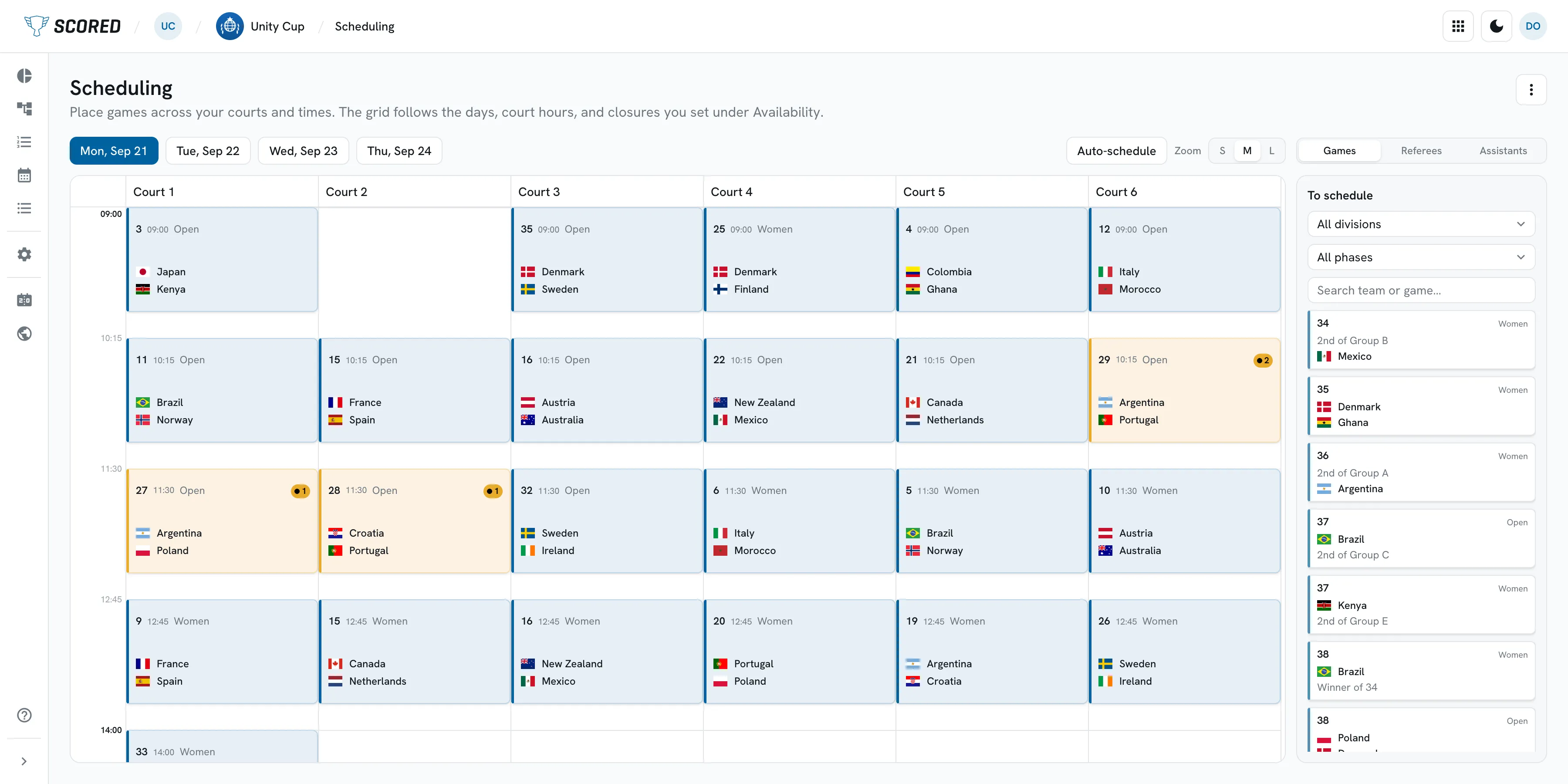
A tournament schedule is a puzzle with real constraints: how many courts, how many hours, who has just played. Scored holds the constraints so you can move the pieces.
One calendar, all your courts
Courts run as columns, days as tabs. The grid follows the court hours and closures you set under Availability, so you are only placing games into time you actually have.
Clash warnings while you place
Put a game somewhere it does not fit and Scored says so there and then - a team with too little rest before its next game, for example - instead of on Saturday morning.
Officials, assigned for you
Auto-schedule fills in the referees and the assistants, including teams helping with each other's games. Referee scheduling comes with the Small plan at $49; assistant referees with Medium at $99.
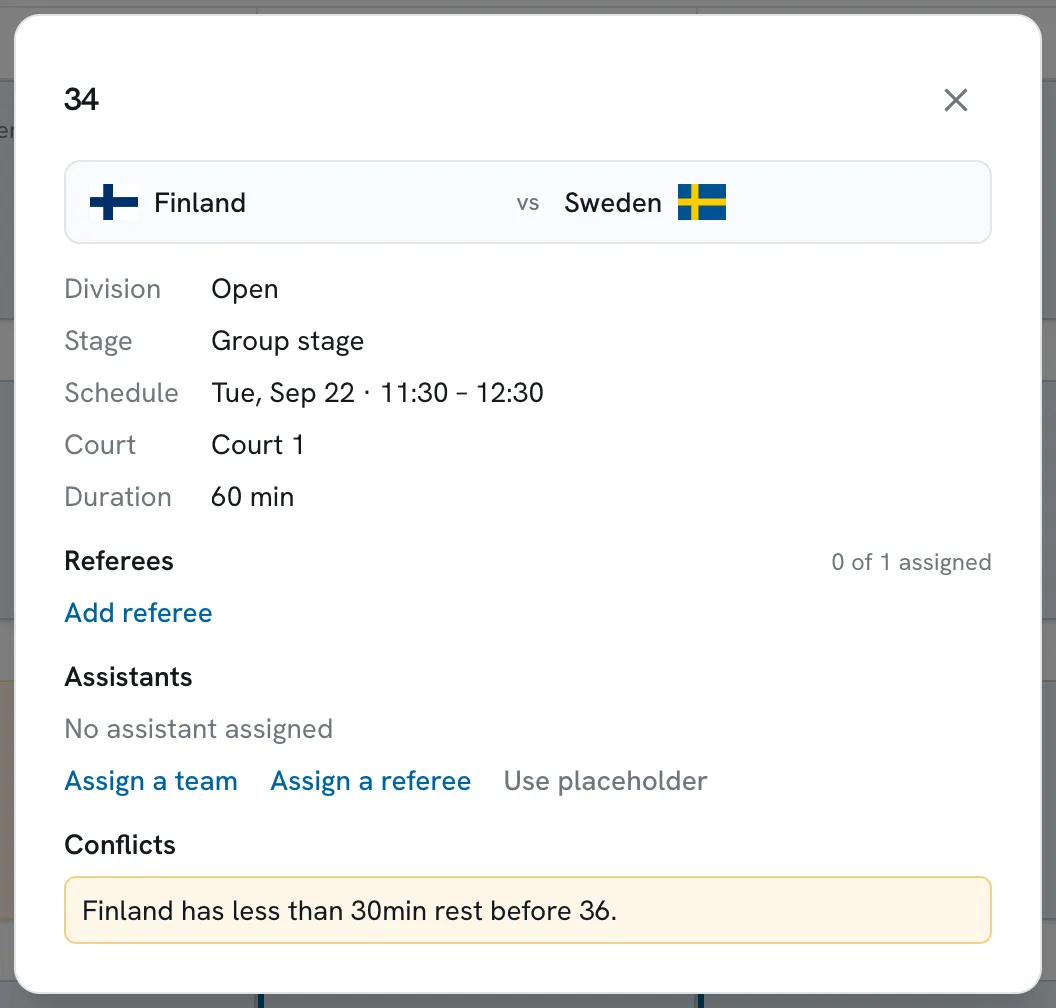
A CONFLICT, ON THE GAME ITSELF
CLASH WARNINGS
Told now, not on Saturday.
The warning lives on the game, while you are still holding it. You can take it, fix it, or decide it is fine - a 25-minute turnaround is sometimes exactly what the day needs - but you are making that call on purpose rather than finding out when a captain does.
The games themselves come from the format you set up on the bracket and group stage page: a round robin where every team in the group plays every other, a knockout, or the two together.
WHEN THE DAY CHANGES
Because it will.
A final goes to a decider. A team's train is late. Drag the game to a new slot, and the schedule your teams keep refreshing on their phones changes with it. Then message every team from the same control room, so the change reaches them before the rumour does.
If you run dodgeball, the sport-specific parts are on the dodgeball page: the scoreboard referees run from their phone, with its clock and penalties, starts on the Small plan at $49, and line-ups come with Medium at $99.
WHAT IT COSTS
One payment, per tournament.
No subscription, and the price follows the size of the event: Free up to 8 teams, Small $49 up to 32, Medium $99 up to 64, Large $149 with no team limit. Prices exclude tax.
What you get, and where it starts
Included in
Multi-court, multi-day calendar
Free
Clash warnings while you place games
Free
Round robin group stages and knockout brackets, seeded for you
Free
A customizable public page with the live schedule and standings
Free
Messaging every team from the control room
Free
Importing your teams into a division from a file
Free
Referee scheduling, and Auto-schedule for referees
Small and up
Spreadsheet exports of the schedule, teams and results
In the setup guide, yes. Each new tournament starts with the setup guide, and its Fill the schedule step puts your games on courts and times. You drag to adjust, or skip the step and place the games yourself. On the Scheduling page, Scored creates the games from your format - a round robin group stage, a knockout bracket, or both - and you drag each one onto a court and a time, with a clash warning while you do it. Auto-schedule then assigns the referees across the games you placed, on the Small plan, and the participant assistants, on Medium.
Can I schedule across several courts and several days?
Yes. Courts are columns and days are tabs on the same grid, and the grid follows the court hours and closures you set under Availability.
What kind of clashes does it warn about?
The ones that come out of where you put the game - a team that would have too little rest before its next game, for example. The warning sits on the game while you are scheduling, rather than in a report you read afterwards.
Do I need a paid plan to schedule?
No. The multi-court calendar and the clash warnings are on the Free plan, which covers events up to 8 teams. Referee scheduling comes with Small at $49 and assistant referees with Medium at $99. Above 8 teams you pay once per tournament by size: Small $49 up to 32 teams, Medium $99 up to 64 teams, Large $149 with no team limit. Prices exclude tax.
Can I schedule a league season, not just a one-day tournament?
You can schedule a season's games the same way - one calendar, your courts, your dates, clash warnings as you place. Today a season runs as one event with a round robin group stage. Multi-tier leagues, and registration and payments, are coming soon.
Can I import a schedule from a spreadsheet?
Not the schedule - you build that in Scored, which is what lets it warn you about a clash as you place each game. Teams and players are another matter. You can import your teams into a division from a file, on every plan including Free, and their players on the Medium plan at $99. From the Small plan up you can export your schedule, teams and results.
What happens when a game runs long?
Drag it to a new slot. The public page your teams are refreshing changes with it, and you can message every team from the same screen so nobody hears it as a rumour.
Build the weekend on one calendar.
Start free for up to 8 teams, no card. Your courts, your hours, and a warning the moment two things want the same slot.